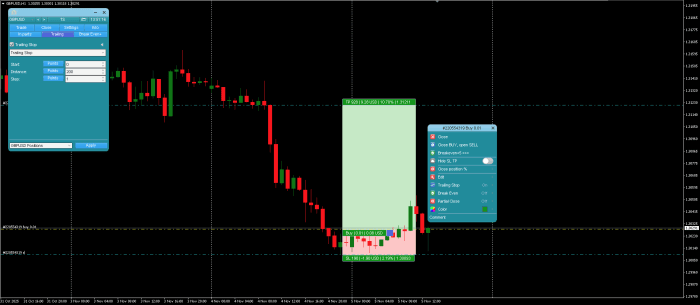
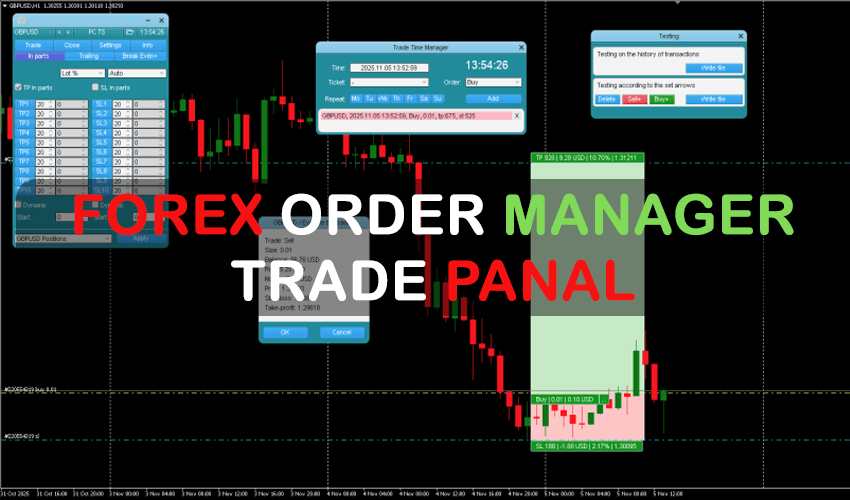
Traders utilizing manual strategies often find value in tools that enhance precision, control, and efficiency. A trade panel designed for manual execution provides a centralized interface for managing and fine-tuning trades. This article offers a technical overview of such a Order Manager, exploring its core functionalities across risk management, order handling, and graphical visualization, without applying a positive or negative bias.
This MT4 Trade Manager in focus presents a range of integrated features, primarily aimed at supporting risk calculated decision-making and trade execution. Developed for manual traders, it brings together risk calculation, order configuration, and market tracking, all within a single system. Below is a breakdown of the functionalities grouped by category.
Order and Position Management Tools of this Order Manager
This Order Manager supports both market and pending orders, allowing for a variety of trade setup scenarios. Some notable functionality includes:
- Trade Time Manager – Allows scheduling of order openings or closings based on specified time frames.
- Partial Close – Enables manual or automated closure of a set percentage of trade volume.
- Trailing Stop Options – Offers 7 variants, based on fixed distance (pips), Fractals, Moving Average, Parabolic SAR, ATR, partial close triggers, or High/Low of previous bar.
- Breakeven Function – Adjusts the Stop Loss to entry price once favorable movement occurs.
- Limit Order Trailing – Enables movement of pending limit orders to follow the market at a set distance.
- OCO (One Cancels the Other) – When an order is triggered, other pending orders linked by this function are automatically removed.
For traders interested in stealth strategies, the panel provides virtual pending orders, virtual stop loss, and virtual take profit levels – concealing key levels from the broker. The Forex Trade Manager is a simpler alternative if you need basic virtual order management without the full feature set.
MT4 Trade Manager also incorporates tools for bulk closing positions based on type or after achieving a target profit.
Risk Management Functions of Trade Panel
One of the primary features of this Trade Panel is the risk calculation tool. This allows traders to determine position size based on preset risk percentages or fixed monetary values. Users can define risk in various forms:
- Percentage of Balance, Equity, Free Marginclass=”fc-gloss-tip” data-slug=”margin” tabindex=”0″>Margin, or Custom amounts
- Fixed values in the account’s base currency
- Dynamic risk based on previous day’s, week’s, or month’s price action (AB values)
The Lot Calc toggle enables or disables this risk calculation tool, while fields such as R/TP and R/SL let users adjust their desired risk-to-reward ratios. For example, a 2:1 ratio signifies the Take Profit target is double that of the Stop Loss. For quick lot size calculations outside of MT4, the Lot Size Calculator web tool provides the same functionality.
Volume is calculated with the inclusion of broker spread and commission, which helps traders get a more realistic view of potential outcomes. The Pip Calculator is another useful companion for understanding pip value across different instruments.may help traders get a more realistic view of potential outcomes.